D
Dave the Locked-Out
Persona · Editorial nomination + collection attribution
Chapter 1 of 6 · Microsoft Store Discoverability

Meet Dave,
the Locked-Out.

Microsoft Store dev. Three years in. Never been featured. Doesn't know how to ask. If he were featured tomorrow, he wouldn't know where — Partner Center would just say "Browse".

Times featured: 0
Public nomination form: none
"Current placements" view: none
If featured: 5–10× install lift
Dave · established Microsoft Store dev
feeling: locked out of the biggest lever in the Store
Dave's three-year wait — a vertical timeline
1
YEAR 1 · hopeful
Reads MS Store docs end-to-end. No mention of editorial.
2
YEAR 1.5 · confused
Asks r/microsoftdevs. No one knows for sure.
3
YEAR 2 · tries to escalate
v2.0 launch. Emails support. Routed to docs that say nothing.
4
YEAR 2.5 · witnesses an outsider
Competitor on Home page Monday, gone Wednesday. Can't tell which rail or how.
5
YEAR 3 · gives up
Stops trying to plan around editorial. "It's a thing that happens to other people."
!
TODAY
If asked "how does an indie get featured?", Dave genuinely doesn't know what to say. The door isn't locked — there's no door.

"I don't know which collection
I came from."

"I want to know which collection I came from. Today there's no way to track which Store collection I was featured in. Collections change frequently so I cannot manually verify I am still there." — Dave Smits, established Microsoft Store dev · 4 June 2026

Featuring is the highest-leverage event in the Store — 5×–10× install lift, weeks of compounding ranking boost. Most devs never get it. Because there's no public mechanism to ask.

Featured install lift: 5–10×
Indie peak: 1000%+
Per-collection attribution: none
"Current placements": none
PAIN A · THE NOMINATION GAP
"No 'Submit for featuring' form. No criteria page. No documented path of any kind. If I want to be considered, I don't know where to start."
Recurring complaint pattern across r/microsoftdevs and MS Q&A.
PAIN B · THE COLLECTION GAP (DAVE, VERBATIM)
"I want to know WHERE on the Store a user landed on my PDP from — not just whether they searched for a keyword. Specifically: which collection / rail / surface inside the Store led them to my app's page."
— Dave Smits · 4 June 2026. One of three concrete pain points he raised; this one stands alone.
WHY IT'S WORSE THAN A KEYWORD GAP
"Featuring is a 5–10× install lever — and unlike SEO/ASO which is gradual, it is a discrete event a dev can plan a launch around. Closing the editorial visibility gap is the highest single-event install lever Microsoft can give devs."

Two halves of the same loop —
both blocked.

PAIN A · BEFORE THE FEATURE

The Nomination Gap

How does Dave get featured in the first place? No public form. No criteria docs. No "submit your launch for editorial consideration" path inside Partner Center. No documented path at all.
0
public nomination paths
inside Partner Center
PAIN B · AFTER THE FEATURE

The Collection Gap

Once Dave's installs spike, where exactly is he? Partner Center Acquisitions surfaces source-level data (Search / Browse / Web link / Related apps) — but not which rail, collection, or surface within "Browse" drove the lift. Collections rotate. There's no "My current placements" view. Dave manually browses the Store to find himself.
8+
in-Store surfaces collapsed
into one "Browse" bucket

The editorial loop · broken at both ends

1 · Nominate
BLOCKED
No public form. No documented path.
2 · Selected
WORKS
Editorial team curates. Cadence ~weekly.
3 · Measure
BLOCKED
Per-collection attribution not exposed. "Current placements" view doesn't exist.
4 · Improve & loop
BLOCKED
Without (1) or (3), Dave can't plan a launch around editorial, can't replicate winners, can't iterate.

The middle works. Microsoft's editorial team is curating quality content on a weekly cadence. The dev-facing surfaces on either side — entry and exit — are what's missing.

Apple gives him a form in App Store Connect.
Google gives him a form in Play Console.
We built one and hid it.

App Store Connect · Featuring · Nominations sidebarSource: developer.apple.com/help/app-store-connect/manage-featuring-nominations
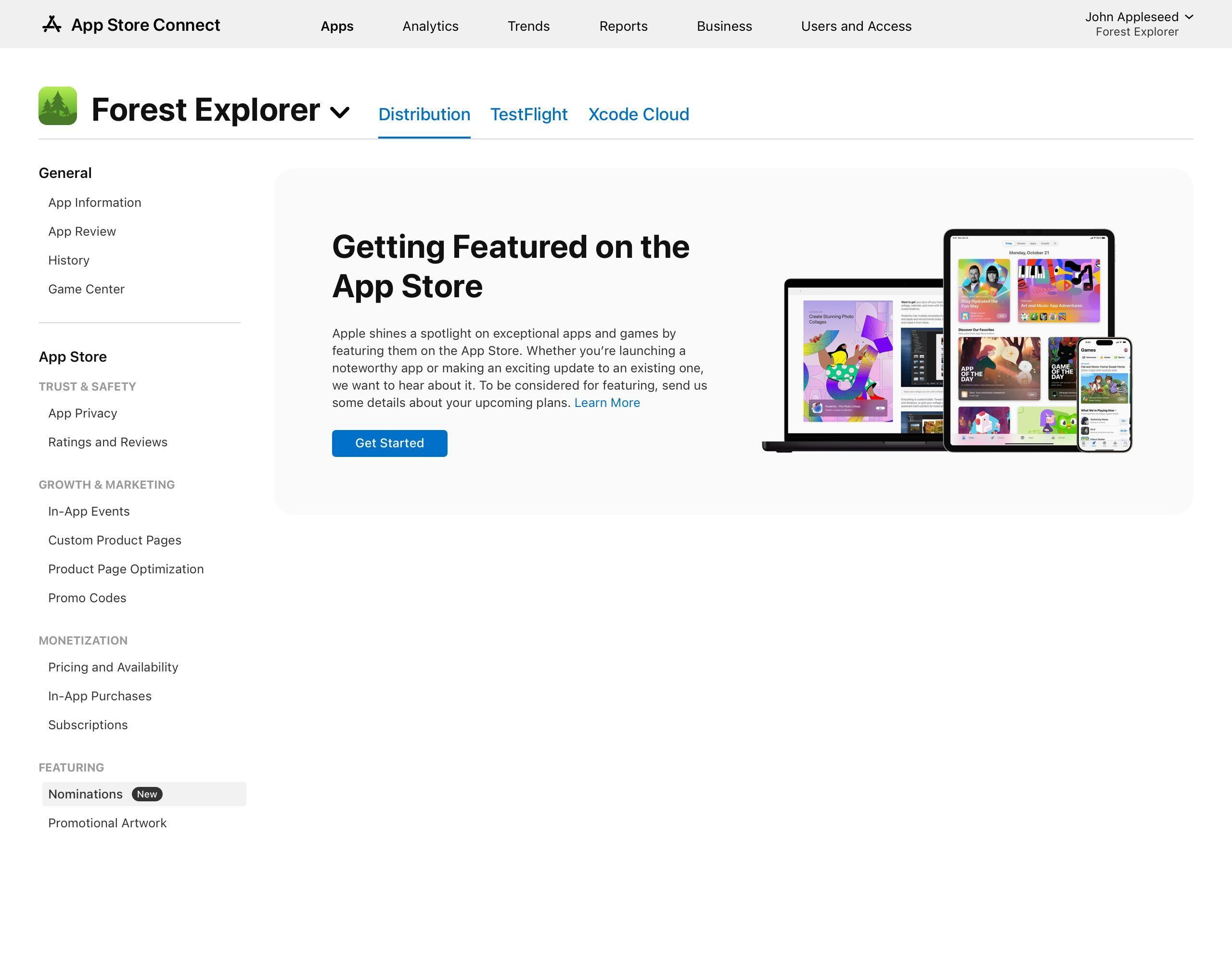
Real Apple App Store Connect screenshot. Left sidebar shows Featuring section selected, with Nominations highlighted. Main pane is titled Getting Featured on the App Store with editorial illustration and Get Started button.
Apple Featuring Nominations · type-selection dialog"New Content / App Enhancements / App Launch" — structured taxonomy
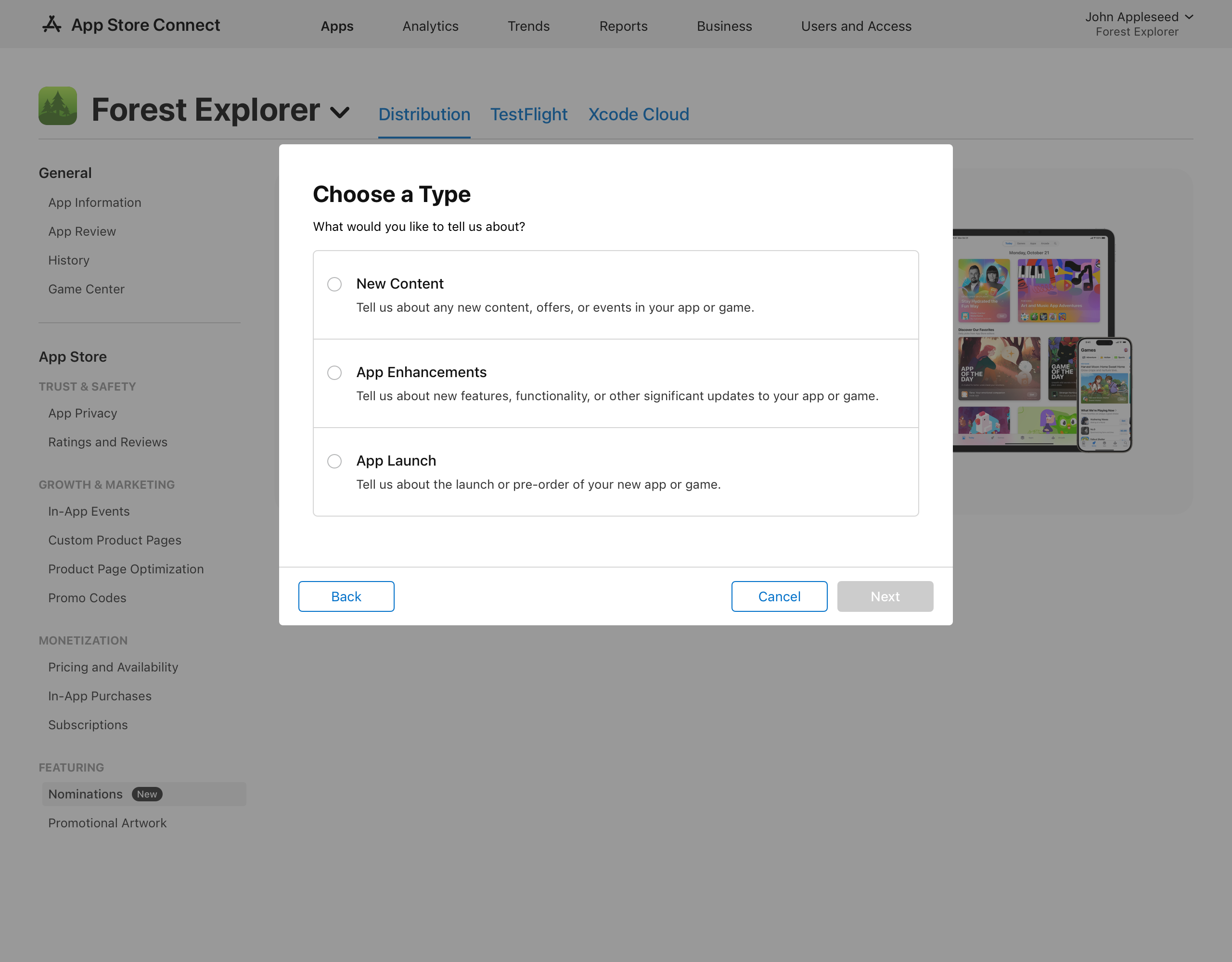
Apple App Store Connect Featuring Nominations type dialog. Three options: New Content, App Enhancements, App Launch.
Apple Featuring Nominations · Additional Information panelCountry/region, In-App Events linking, supplemental URLs, helpful details
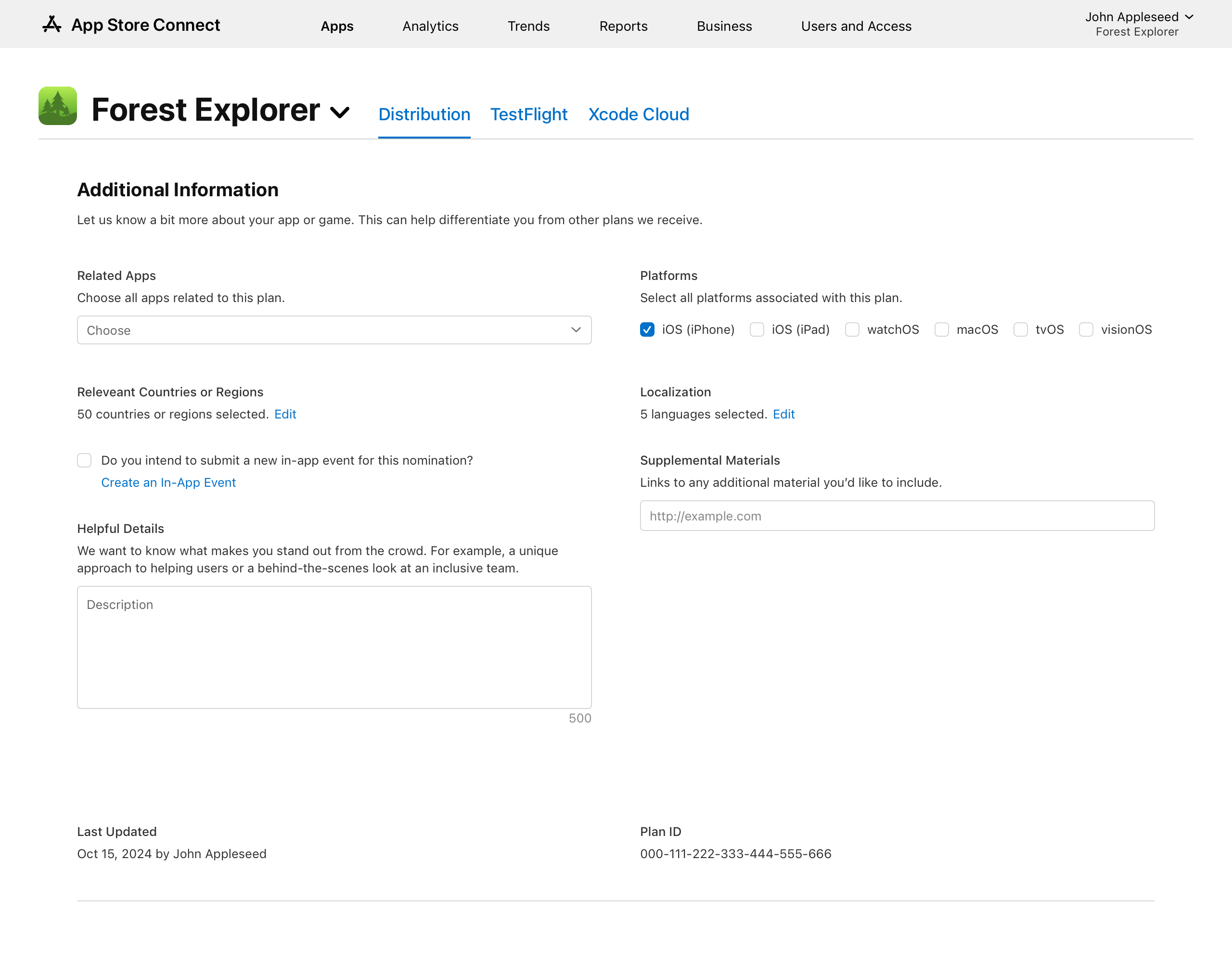
Apple App Store Connect Featuring Nominations Additional Information page showing fields: Related Apps, Platforms, Relevant Countries or Regions, Localization, Supplemental Materials, Helpful Details.
What this means for Dave on Apple
Step 1
Open ASC sidebar. Click "Nominations" under Featuring. No external form. No email.
Step 2
Choose a type: New Content / App Enhancements / App Launch.
Step 3
Submit + track status. Drafts saved, submission confirmed, edit-after-submit supported. Up to 10 apps per submission, country & localisation targeting.
GOOGLE PLAY CONSOLE · FEATURING NOMINATION
A nomination form inside Play Console — any dev can submit.
Google ships an in-Play-Console featuring nomination form open to every developer with a published app. Submissions are tracked with status. Categories include:
Editor's Choice
Premium curated apps. Visible badge on listing.
Indie Corner
Explicitly lowers the bar for small devs. Sub-criteria designed for indie scale.
Best of [month]
Themed monthly editorial cycles. Plannable.
Themed collections + Play Pass
Holiday rails, themed surfaces, Play Pass inclusion.
Source: Google Play Console Help · support.google.com / googleplay / android-developer / answer / 12932541. Form is access-restricted to logged-in Play Console accounts, so no public UI screenshot is available — the form structure is documented in Play Console Help.
Partner Center · Featuring nomination surface
Built. Not advertised.
Functionally invisible.
A nomination form exists internally — Microsoft built one. But there's no sidebar entry inside Partner Center, no link from the developer docs, no "Submit your launch" callout anywhere a dev would look. The form sits behind a private URL, surfaced by Microsoft to a small set of devs Microsoft chooses. To Dave, it doesn't exist.
Apple App Store
In-product form
App Store Connect · Featuring · Nominations
Google Play
In-product form
Play Console nomination + Indie Corner
Microsoft Store
Nothing
No documented nomination path
Pain A · Getting nominated
Public, dev-self-serve nomination form
Structured nomination types (Launch / Update / Event)
Status tracking (Draft / Submitted / Reviewed)
Editorial criteria documented for developers
Lowered-bar surface for indies (Indie Corner equivalent)
°
Pain B · Knowing where you're featured
Per-collection install attribution
°
°
"My current placements" dashboard view
°
Notification when feature starts / ends

Four moves.
The mechanism already exists.

Move 1 · Open the door
"Submit for featuring" form inside Partner Center.
Mirror Apple: sidebar entry + three nomination types (App Launch / App Enhancement / In-App Event) + country targeting + status tracking. Pattern's already validated.
Move 2 · Lower the bar for indies
An "Indie Corner" equivalent.
Google's Indie Corner explicitly carves out a featuring track for small devs. Pairs with the free-registration / FastTrack push — otherwise indies onboard with nowhere to go.
Move 3 · Show current placements
"My placements" card on the Overview page.
Lists every collection / rail the app appears on, with timestamps. Zero algorithmic work — just exposing what editorial has already decided.
Move 4 · Attribute per collection
Break "Browse" into its sub-surfaces.
Decompose into Editor's Picks / themed rails / category landing / charts — ~8 sub-surfaces. Dave can finally say "the Productivity rail drove 60% of my featured-week installs".

What ships when

P0 · THIS SPRINT
Move 3.
"My placements" card. Surface what editorial already decided. Zero engineering on attribution.
P1 · 1Q
Move 1.
"Submit for featuring" form in Partner Center. Mirror Apple's structure + status tracking. Document criteria.
P2 · 2Q
Move 4.
Decompose "Browse" into ~8 sub-surfaces. Per-collection attribution.
P3 · 3Q
Move 2.
Indie Corner-equivalent. Ties the free-registration push into discovery, not just publication.

Editorial as a repeatable lever,
not a random spike.

Today's editorial loop · spinning at quarter-speed

1 · Dave can't nominate
No form. No documented path.
2 · Editorial picks blind
Without dev signal, editorial picks from a narrower pool. Less optimised mix.
3 · Dave can't measure
Spike happens, source = "Browse", which rail? Unknown. Can't replicate.
4 · Loop doesn't close
Editorial gets no dev feedback on which rails converted. Devs don't plan launches around editorial.

If we ship the four moves · loop closes, lift compounds

1 · Dave nominates
In-Partner-Center form. Three nomination types. Status tracked.
2 · Editorial picks from a richer pool
Dev-submitted launches surface to editorial. Indie Corner ensures small devs get their shot.
3 · Dave measures per collection
"My placements" view + per-collection attribution. "Productivity rail drove 60% of my featured-week installs."
4 · Loop closes, lift compounds
Devs plan launches around editorial windows. Editorial gets per-rail conversion data. Both sides optimise. Install-velocity boost from each feature compounds into ranking for weeks.
One featuring slot = 5–10× daily installs that week
+ weeks of organic ranking lift from install velocity.
Stop rewarding randomly. Make it a planning surface.